If you want to know how profitable your business is, you’ll need to pay for bookkeeping services or do it yourself. Monthly bookkeeping rates for very small businesses are typically $500 – $1,000. However, many entrepreneurs cannot afford that cost. They turn directly to accounting systems like QuickBooks or Wave to teach themselves basic accounting and track financial information like sales, expenses, loans, owner draws and more.
Working in these systems can be difficult even if you have accounting experience. You might know exactly how a loan payment should be recorded—that the principal portion should debit your liability account—but that knowledge only helps if you can find where to record it. And when the right button is buried under three menu layers, on the right tab, behind four pop-ups in a newly redesigned version of QuickBooks, finding that button can be the hardest part!
I have trained dozens of entrepreneurs to get familiar with and manage their own accounting systems. I created Bookkeeping Basics walkthrough videos to help with setup and regular categorization. However, even with my videos and 1:1 training, there are some common mistakes that many entrepreneurs make:
Inconsistently Categorizing the Same Expense
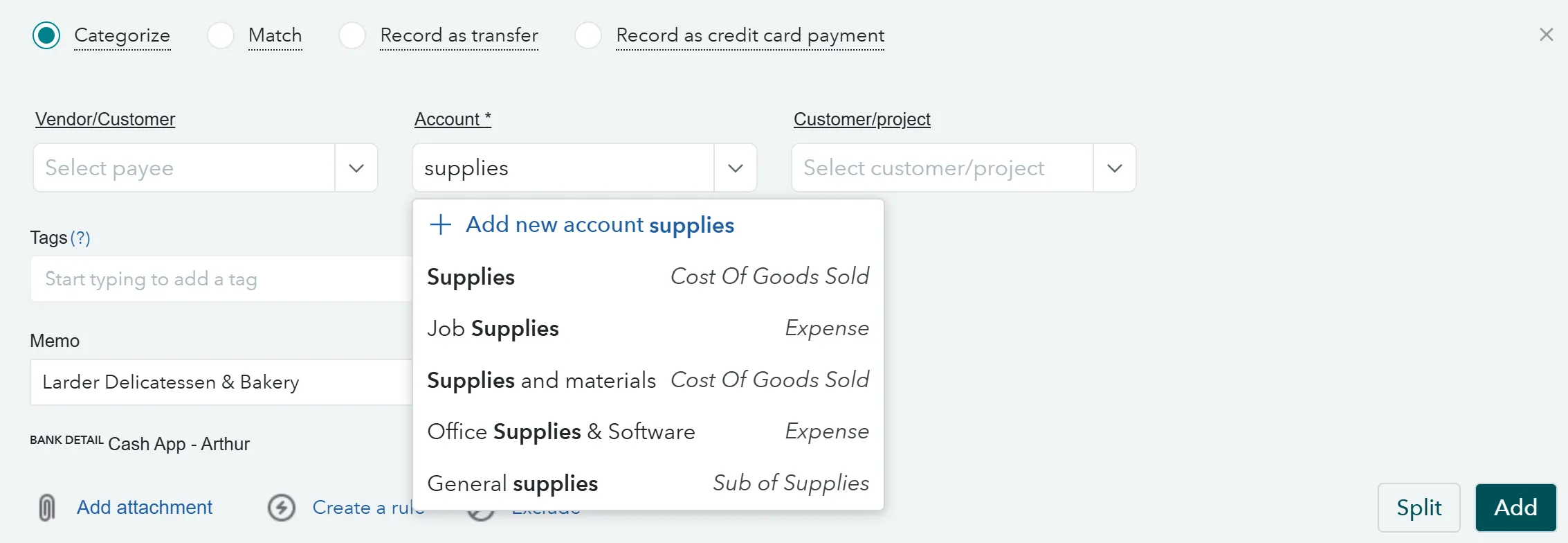
When you’re categorizing transactions, you might accidentally create several different accounts (aka categories) for the same kind of thing, as shown above. The most common category this happens with is “supplies.” You might start out with good intentions to track specific types of supplies separately, but generic category names often make it hard to remember which category is supposed to track what. Every time entrepreneurs go into QuickBooks, they might categorize the same kinds of supplies into different “supplies” categories.
To avoid this, try to limit your “supplies” categories to two or three and give them specific names, like:
- Ingredients & Packaging
- Kitchen Tools & Supplies
- Office Supplies & Equipment
Transfers Recorded as Sales or Expenses
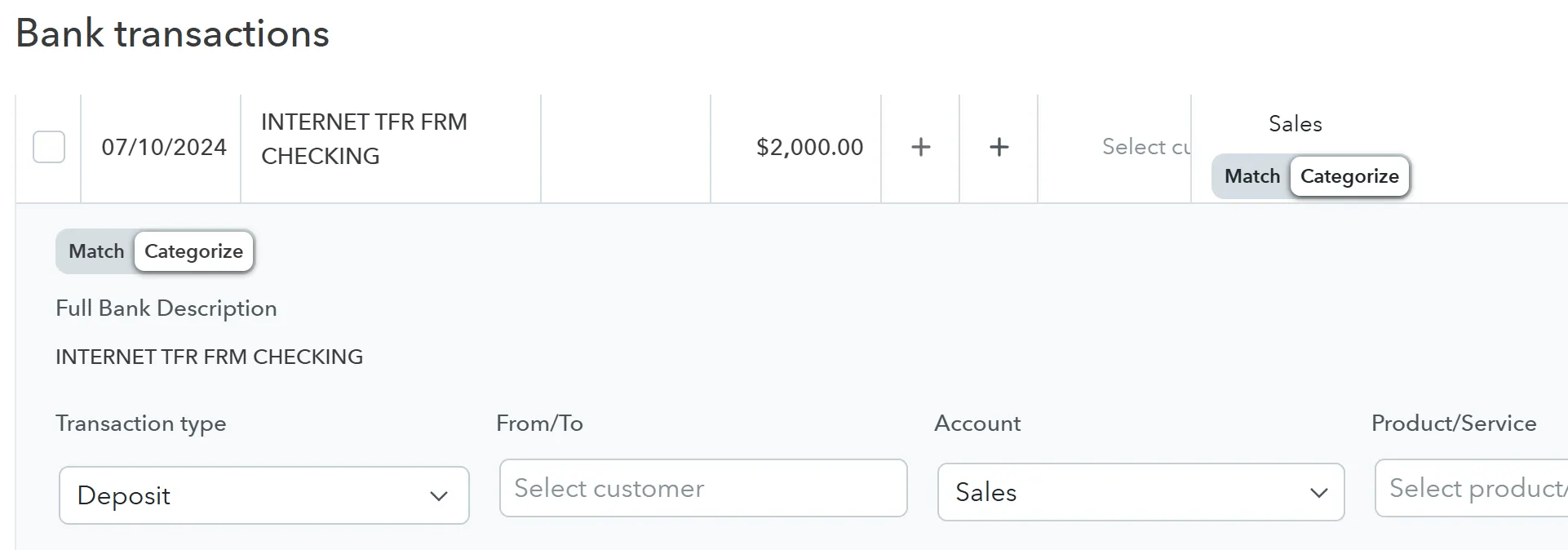
Many, many entrepreneurs miscategorize transfers between their checking accounts or transfers from checking accounts to credit cards (i.e. credit card payments). Instead of marking them as transfers, they mark them as sales or some kind of expense. As you can see in the example above, QuickBooks is actually suggesting that this $2,000 credit card payment be categorized in the “Sales” account, which is incorrect. Do not assume QuickBooks is correct every time it makes a suggestion.
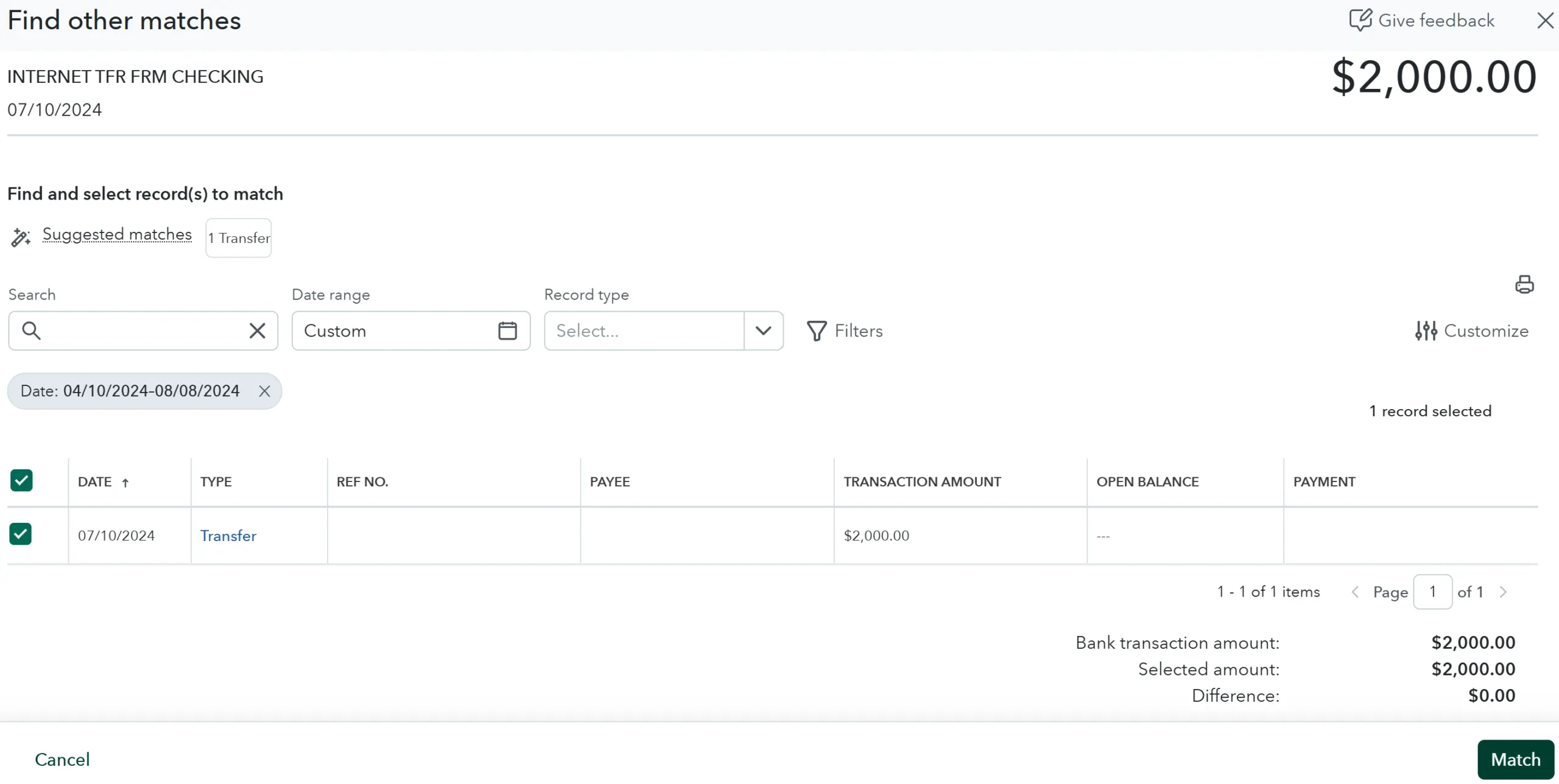
Instead, in this version of QuickBooks, click “Match” instead of “Categorize.” “Match” should pull up the other side of the transaction so you can pair the negative $2,000 from the checking account with the positive $2,000 shown on the credit card.
Miscategorizing Loan Payments
If you receive a loan and are making regular payments on it, it might make sense to categorize those payments as a tax-deductible expense. While reviewing your Profit & Loss statement, this would show as reducing your Net Income, which is also your tax liability. However, only the interest portion of each loan payment is tax deductible. The principal portion, meaning the part of each payment repaying the actual base amount that was borrowed, is not tax deductible. Whatever you spent the money on is most likely tax deductible, but you can’t count both the purchases you made with the loan money and the repayment of the loan itself as tax deductible expenses.
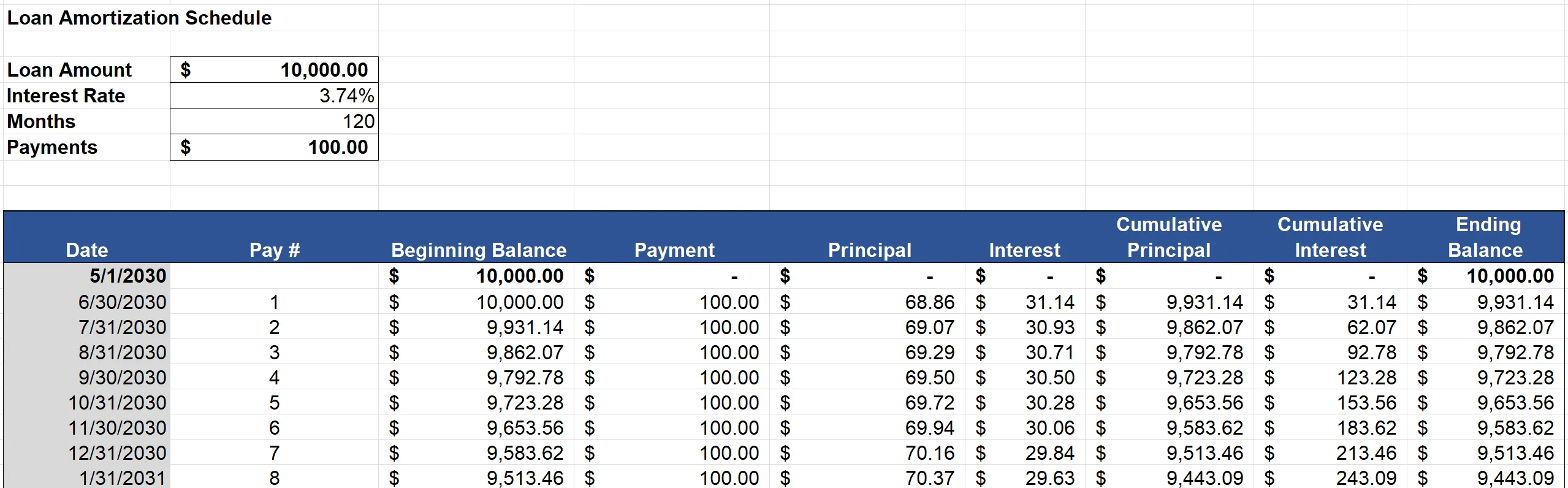
Always ask your lender for an amortization schedule when you are signing the paperwork for your loan. This schedule breaks down each and every payment on your loan. It states how much of each payment is interest or expense, like this:
To accurately report your expenses each month, “split” your loan payments between interest and principal according to your amortization schedule, like this:
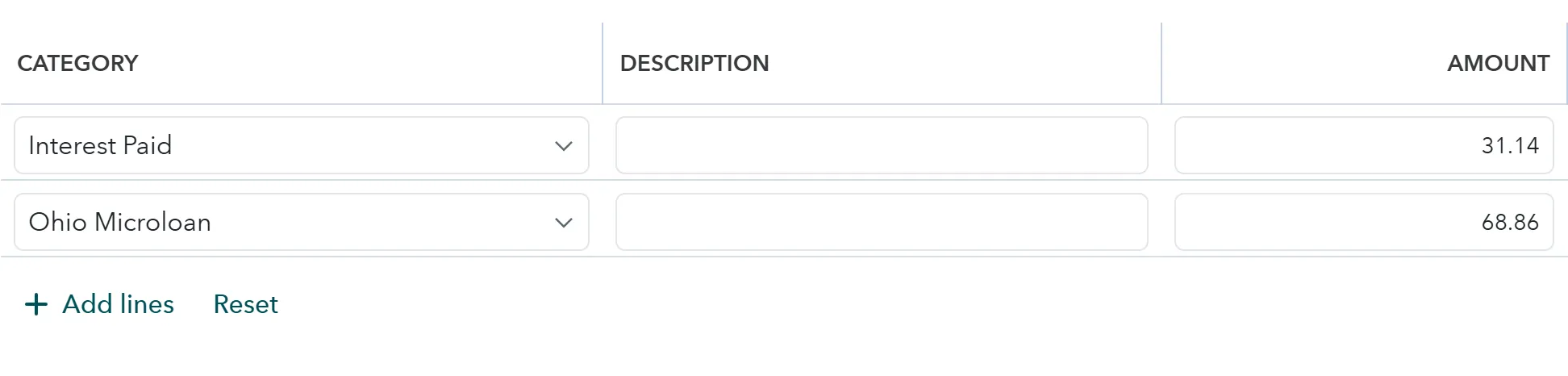
Too Many Products/Services
Finally, entrepreneurs can make the mistake of creating a new Product/Service every time they create an invoice for a customer. In accounting systems, there is a list of Products/Services that you can tag on an invoice. That list should be as short as possible. If you want to run any reports or analyze the popularity of your different Products/Services in your accounting system, it quickly gets difficult when you have 112 items to sort through. More importantly, each Product/Service has to be linked to a specific Sales category if you ever want to see how much one type of product is selling compared with another type of product.
What ends up happening is this. Let’s say you sell a custom cake to a customer and invoice them. The invoice has a spot for Product/Service, so you type that in, trying to add a little description to personalize it for the customer. Something like this:
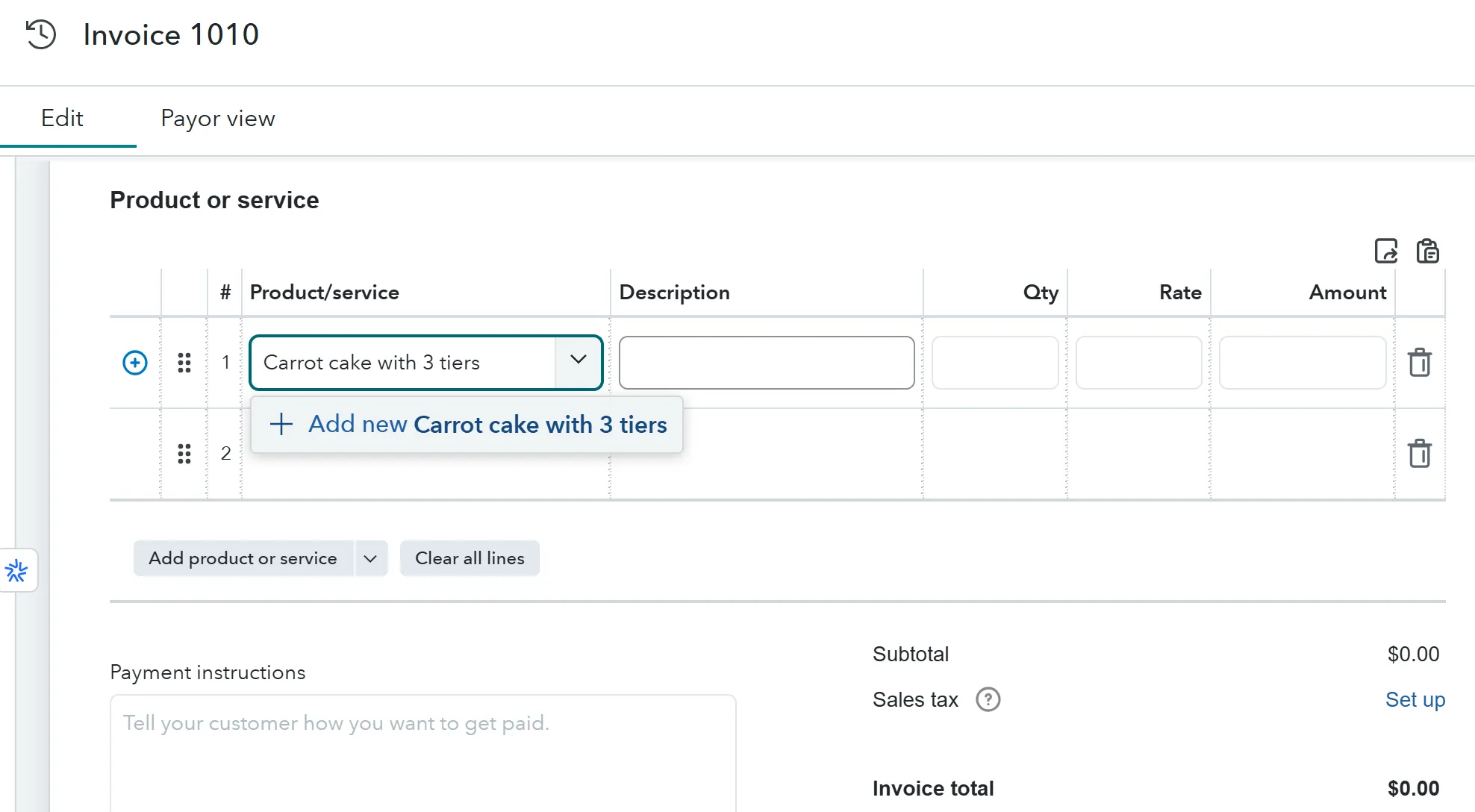
The system prompts you to add a new Product/Service for what you’ve typed in, and why wouldn’t you click that seemingly helpful button that just popped up? You’re trying to spend as little time as possible in a system that is both difficult to navigate and mind-numbingly grayscale. Unfortunately, if you do this for every invoice you create, you will end up with as many Products/Services as you have invoices.
Instead, create as few entries as possible using one entry to cover a whole group of items. Then, click one of those premade Products/service for every invoice, and use the description field to speak to the customization of the product, like this:
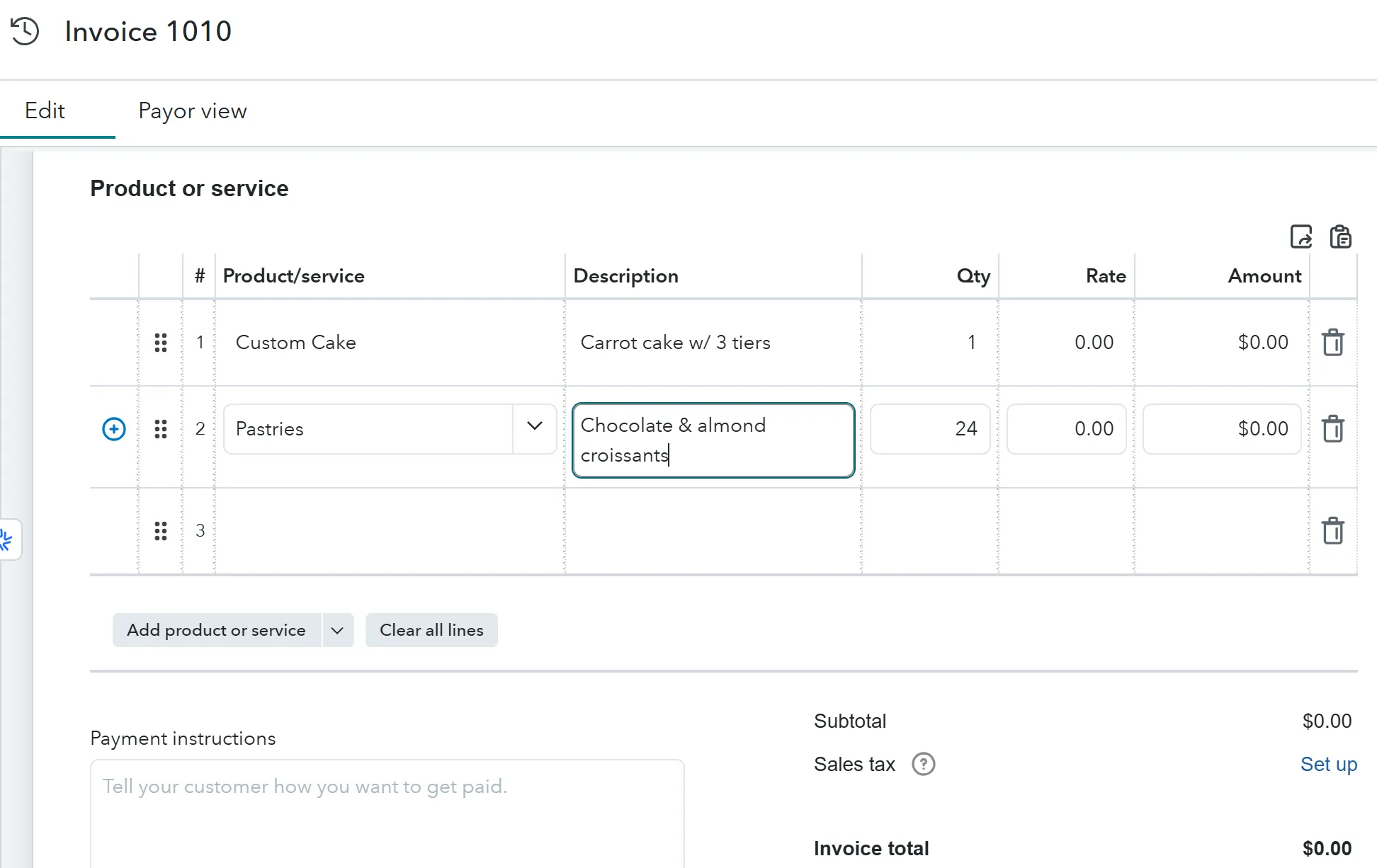
This way you’ll be able to report clearly on the number of different kinds of products you’re selling by month, as well as how much revenue you made from Pastries vs. Custom Cakes.
If you choose to do your own bookkeeping, there are two things that can help with all these common mistakes. One, do your bookkeeping weekly so the process stays fresh in your mind. Two, review your financial reports, including your Profit & Loss and Balance Sheet, at least once a month. As you review them, see if you can actually identify what each account is and whether there are any surprises. If you are confused, drill down into specific numbers. You can actually click them right on the report. If they don’t make sense, recategorize them.
If you want resources for learning bookkeeping, here are my videos on Wave and QuickBooks: Bookkeeping Basics.
If you’re ready to use your time on tasks other than bookkeeping, or if your current bookkeeper is not empowering you enough with your financials, reach out to me to discuss JumpStart’s bookkeeping services: [email protected].
Share This Article With Your Network!